On this page
Fix My Project
Your ship came back for changes, or got rejected? That's normal, and it's fixable. A reviewer asks for changes when something is missing or unclear, not to punish you. This page lists the most common reasons and exactly what to do about each, so you can fix it and resubmit.
Adapted from @alexren at hwdocs.hackclub.com
What "changes requested" actually means
When a reviewer asks for changes, your ship moves to a changes requested state. You will see a banner at the top of your project page with their feedback. Read it, make the fixes, then hit the Resubmit for Review button further down the page to send it back into the queue.
Nothing is lost while you fix things. Your project, your hours, and your journals all stay put. If you decide you would rather not make the changes, there is also a way to withdraw the ship instead. Most projects that come back just need one or two of the fixes below.
The rest of this page walks through the eight reasons a ship usually comes back, with the fix for each.
1. Missing project files
The fix: include your source files, not just exports or builds. Source files let reviewers verify your work and help you debug. Export formats and compiled builds lose important information.
Software projects:
- Include your actual source code, not just a built/compiled version.
- If you have a build step, include instructions on how to run it locally.
- Include a
package.json,requirements.txt, or whatever dependency file your project uses. - Don't commit
node_modules, build folders, or.envfiles. Use a.gitignore.
Hardware projects:
- 3D models: STL/OBJ/3MF files aren't enough. Include the original source (.f3d for Fusion, Onshape link, etc.) AND a .STEP file.
- PCBs: Include .kicad_pro, .kicad_sch, and .kicad_pcb files (or the equivalent for EasyEDA). Gerbers alone aren't enough.
- Firmware: Include as much code as possible, even if it can't fully run without the hardware.
Source files let reviewers verify your work and help you debug issues. Export formats and compiled builds lose important information.
2. Messy, hard-to-read repo
The fix: group files by purpose so a reviewer can find what they need without digging. A reviewer should be able to open your repo and figure out what's in it within thirty seconds. If they can't, they'll send it back.
Here's ember, a USB-C reflow hotplate, as a reference. Notice how design source, manufacturing outputs, firmware, and visuals each live in their own top-level folder:
ember/
├── hardware/         # All design source (electrical and mechanical)
│   ├── board/        # KiCad project for the controller PCB
│   ├── heatbed/      # KiCad project for the heatbed PCB
│   ├── case/         # OnShape STEP exports
│   └── lib/          # Shared symbol/footprint libraries
├── software/         # STM32 firmware
│   ├── Core/
│   ├── Drivers/
│   └── Makefile
├── production/       # Fab-ready outputs (gerbers, BOM, CPL)
├── assets/           # Renders, schematic images, banners
├── BOM.csv
└── README.md
A few principles make this work:
- Split by purpose, not by file type.
hardware/holds all design source, electrical and mechanical together.production/holds the deliverables a fab house needs. Don't scatter STEP files across three different folders. - Each PCB gets its own folder. If your project has multiple boards, give each one a sibling folder under
hardware/(likeboard/andheatbed/). Don't mix.kicad_pcbfiles at the root. - Keep manufacturing outputs separate from source. Derived files (gerbers, BOMs, position files) belong in their own folder so a fab house can grab just that folder.
- Firmware is its own thing. Give it a top-level
software/orfirmware/folder, don't bury it insidehardware/.
For software-only projects, the same idea applies. Separate src/, tests/, docs/, and config files. Don't dump everything at the root.
A reviewer should be able to open your repo and figure out what's in it within thirty seconds. If they can't, they'll send it back.
3. The project isn't complete
The fix: make it complete enough that someone could actually use or build it. It doesn't need to be perfect, but the core has to work.
Software
Don't submit a half-built app with placeholder pages and TODO comments everywhere. The core features should work. If you have a login page, it should actually log you in. If you have a search bar, it should actually search.
Hardware
Your project needs to be complete enough that someone could actually build it. That means:
- 3D models should include all electronics (microcontrollers, screens, motors, batteries), not just the case. Adding every component prevents expensive assembly mistakes where things don't physically fit.
- Firmware should contain your actual project logic, not basic test sketches like "blink LED" or "read sensor." Include compilation instructions so someone could build it.
- Wiring diagrams should label every connection clearly. A single line connecting screenshots of parts is not a wiring diagram.
4. Weak README
The fix: your README is the first thing a reviewer sees, so make it explain the project on its own. If a reviewer can't understand your project from the README alone, it'll get sent back.
A good README covers:
- What the project is and what it does.
- How to set it up and run it (for software: install steps, commands to run. For hardware: assembly instructions).
- What components/dependencies are needed.
- Screenshots or photos showing what it looks like.
5. Bloated parts list (hardware)
The fix: request only what the build actually needs. We're a nonprofit with limited funds, so be efficient. If there's a cheaper alternative that works, use it.
Common issues:
- Requesting overpowered parts for simple tasks.
- Adding "just in case" extras.
- Poor sourcing (paying $35 for an Arduino when you can get a compatible board for $5).
- Requesting a full spool of filament for a 100g print.
6. Lack of polish
The fix: make it look intentional. Polish is what turns a working prototype into a finished project. You don't need perfection, but it should look intentional.
Software: Does it have a clean UI? Are there broken links or placeholder text? Is there error handling? Could you show this to someone and they'd understand how to use it without you explaining?
Hardware: Does it have an enclosure or case? Are the edges clean? No dangling wires or exposed breadboards in the final build.
Here's an example. The Orpheuspad before and after polish:
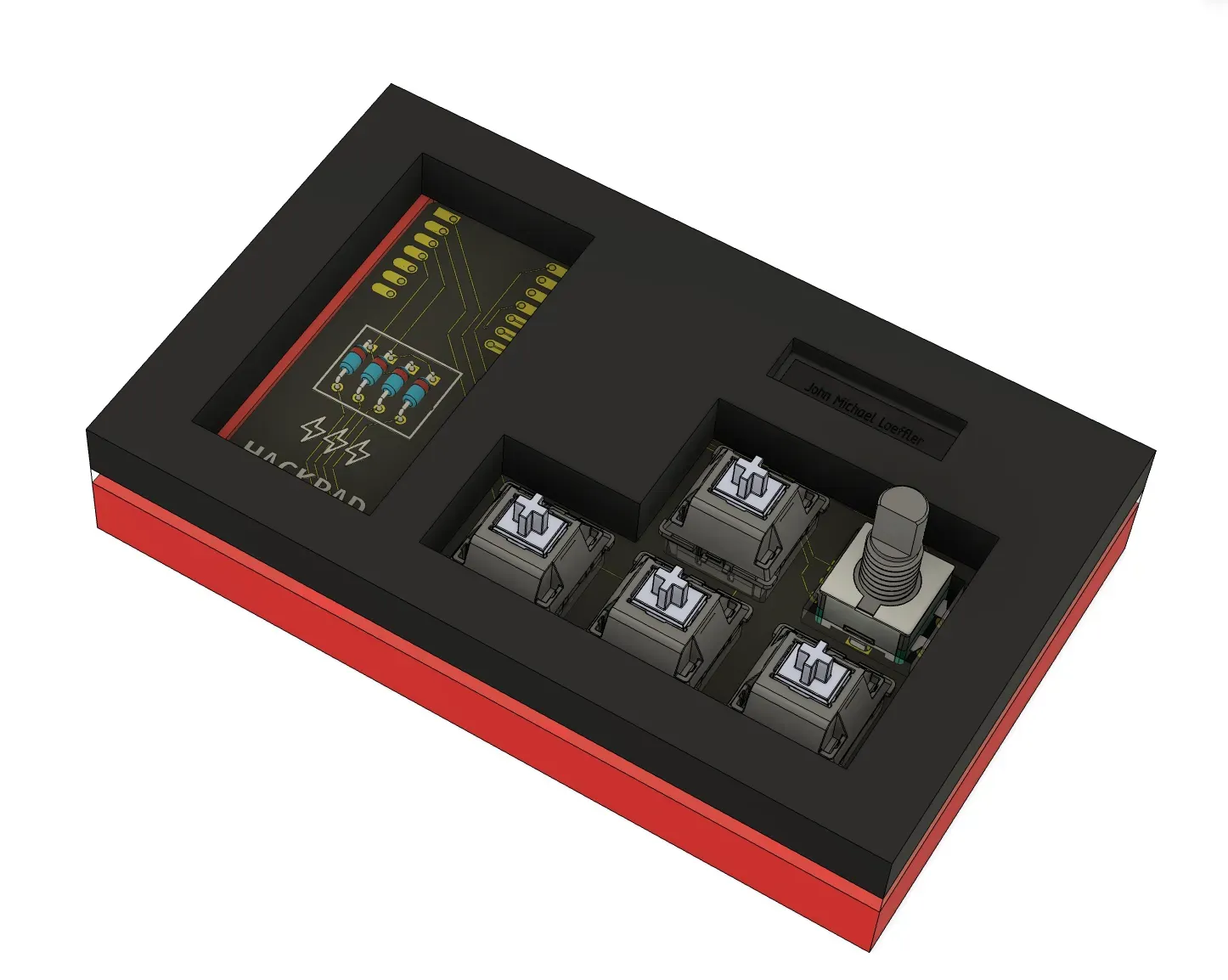
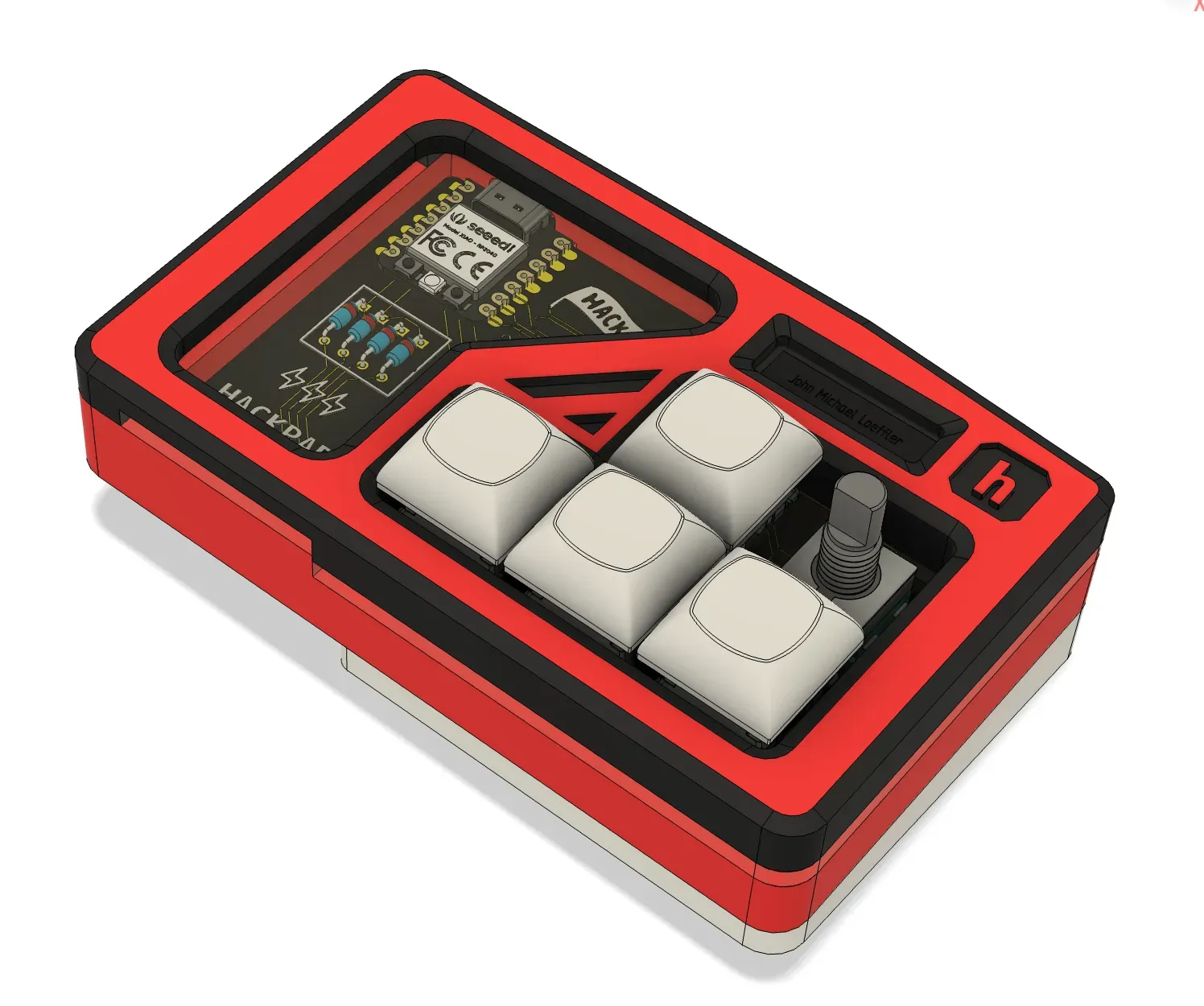
The polished version has embossed patterns, a tilt angle, rounded corners, chamfers, and a logo. The same principle applies to software: a polished app has consistent styling, good error messages, and a UI that makes sense without a manual.
7. Too much AI
The fix: AI assistance is allowed, but your submission has to be work you understand and have polished. If a reviewer flagged heavy AI usage, here's how to recover:
- Rewrite AI-heavy modules by hand. Pick the parts you don't understand and write them from scratch. Reviewers can tell the difference.
- Add your own polish. Error handling, edge cases, real test coverage, UI refinements. These are the things a one-shot AI prompt doesn't produce.
- Rewrite the README in your voice. Explain the trade-offs you made and the parts you struggled with.
- Check your journals. Journals must be written by you, not AI. If any were generated, rewrite them honestly before resubmitting.
- Be able to explain every line. If a reviewer asks how a function works and you can't answer without re-asking the AI, rewrite that function.
On your project page, tick the I used AI on this project checkbox and honestly describe what you used AI for. Reviewers care less about the fact and more about what you did with the output.
8. Plagiarism or fraud
This is the one category that doesn't get fixed by resubmitting. These get your project permanently rejected:
- Following a tutorial almost exactly 1:1 and submitting it as your own.
- Submitting a project built by someone else as your own.
- Using AI to generate your entire project without any review, polish, or iteration (AI-assisted work you understand and refine is fine; AI-generated journals are never fine).
- Intentionally inflating tracked time (leaving Hackatime running while not coding, leaving timelapse running while inactive).
Plagiarism or fraud results in a permanent ban from the program and potentially Hack Club as a whole. Don't risk it.
Two questions that aren't really about your ship
Sometimes the thing that feels broken is your streak or your hours, not the ship itself. These two come up a lot:
"My streak broke even though I coded for an hour." First, the good news: an hour of work on any project keeps all your streaks alive for that day, so a streak rarely truly resets if you logged real time. If a specific project's streak didn't go up, that's a different thing: a project only advances on a day you put a full hour into that project, so an hour split across several projects, or editor time logged under a different Hackatime project name, won't move any single plant. A streak only resets to 0 on a day with no qualifying hour on any project and no freeze to cover it. The full rule, including how journal hours stack and how freezes work, is in Currency. For making sure your editor time lands on the right project, see Hackatime.
"My total time shows more than I logged in Hackatime." That's usually expected, not a bug. Your total can include journal hours you logged for non-coding work (art, design, hardware assembly) on top of your Hackatime time. Reviewers decide the final approved hours and can adjust time that isn't backed by real work. See Hackatime for how hours add up and Currency for how approved hours turn into gold.
See also
- What is shipping? , how reviews and resubmits work
- Good Journaling , what reviewers expect from your journal entries
- Sourcing Parts , how to request hardware funding efficiently
- Currency , how gold, streaks, and approved hours work
- Hackatime , why your hours may look low or high